

IQOS ILUMA i Standard Violet Real Use Review & Troubleshooting Guide (Dubai, UAE)

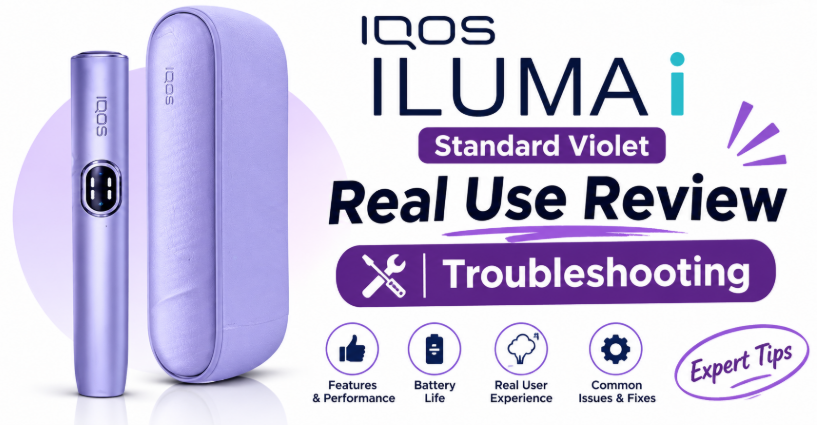
The IQOS ILUMA i Standard Violet is a bladeless, induction-heated device that works only with TEREA sticks. In everyday use it heats in about 20 seconds, delivers an even draw from start to finish, and needs very little cleaning. Most problems (not turning on, stick not detected, weak taste, error lights) come from a low battery, a wrongly inserted stick, or residue in the chamber, and can be fixed in minutes.
Iluma i standard violet real use review troubleshooting
Why This Review Exists
Search for the Violet Standard and you will find dozens of pages that repeat the same three lines of product copy. They tell you the colour, the brand and the price. They rarely tell you what daily use is actually like, what goes wrong, and how to fix it.
This guide is built around the questions real buyers ask after the box arrives:
- Is it easy to use from the first day?
- How does it behave in Dubai’s heat and air-conditioned interiors?
- What do I do when it will not turn on, will not heat, or flashes a warning light?
You will find a clear product snapshot, a real-use walkthrough, an honest pros and cons table, and a full troubleshooting section. Every product and blog link in this article has been checked against the live Terea Store UAE website.
IQOS ILUMA i Standard Violet at a Glance
The Violet is one colourway in the ILUMA i Standard range. If you are still choosing between models, start with the IQOS ILUMA i Standard category or the main IQOS ILUMA in Dubai collection.
| Feature | Detail |
|---|---|
| Device | IQOS ILUMA i Standard, Digital Violet |
| Heating technology | Induction (bladeless) |
| Heating temperature | 350°C |
| Body material | Aluminum |
| Battery capacity | 2900mAh |
| Full recharge time | About 135 minutes |
| Display | Indication and control |
| Smart features | Pause during session, extra puffs mode, economy mode |
| Compatible sticks | TEREA only |
| Price (Nov 2026) | AED 275 (list price AED 380) |
View IQOS ILUMA i Standard Violet in Dubai →
What Is the IQOS ILUMA i Standard?
The ILUMA i Standard belongs to the newest generation of IQOS heated tobacco devices. Instead of a metal blade that pushes into the stick, it uses induction. A TEREA stick contains a small metal element, and the device heats that element directly, which warms the tobacco from the inside out without burning it.
Three practical results follow from that design:
- No blade to break. Older IQOS owners will remember the fragile heating blade. That part simply does not exist here.
- Less residue build-up. There is no blade surface for tobacco to cling to, so upkeep is lighter.
- A steadier draw. Heat spreads through the stick more evenly, so the first puff and the last feel closer to each other.
The Standard sits between the compact IQOS ILUMA i ONE and the premium IQOS ILUMA i Prime. It adds personalisation options and session controls that the entry model keeps simple.
The Violet Finish: Design and Feel
Colour is the only thing that separates the Violet from the Black, Blue or Terracotta versions of the Standard. The finish is a rich purple with a soft, modern look that photographs well and does not look loud in person.
Here is what stands out in daily handling:
- Weight and build. The aluminum body feels solid without being heavy. It sits comfortably in a jacket pocket or a small handbag.
- Grip. The finish resists the slippery feel some glossy devices develop in humid weather.
- Visibility. The purple tone is easy to spot at the bottom of a bag, which cuts down on misplaced devices.
- Wear. Like any coloured device, it can pick up light marks from keys and coins if carried loose. A simple pouch solves that.
If you like the shade but want a different tier, the IQOS Iluma i One Digital Violet offers a purple look at a lower price point, and the IQOS ILUMA i Standard Electric Purple gives a bolder purple alternative.
Unboxing and First-Time Setup
A smooth first day sets the tone for everything after it. Follow this order.
Step 1: Check the Contents
Open the box and confirm the device, the charging cable and the printed guide are present. Look over the body for scratches or dents. Buying from a reliable retailer matters here, because genuine packaging and complete accessories are the first sign of an authentic device.
Step 2: Charge Fully Before the First Use
Plug the device into a wall adapter with the supplied cable. A full charge takes about 135 minutes. Resist the urge to test it after ten minutes. A full first charge helps the indicator read accurately from day one.
Step 3: Choose the Right Sticks
The Standard accepts TEREA sticks only. If you are new to them, browse the full TEREA collection in Dubai and compare flavour profiles before you commit to a carton.
Step 4: Personalise
The ILUMA i range supports adjustable settings such as vibration feedback and session behaviour. Spend two minutes setting these up. Small tweaks make the device feel like yours.
Step 5: Run Your First Session
Insert the stick straight into the opening until it seats fully, then let the device detect it and begin heating. When the indicator signals ready, take your first draw.
Real Use Review: What Daily Life With the Violet Is Like
This section describes the day-to-day experience based on how the device is designed to behave and the patterns buyers commonly report. Individual results vary with stick type, climate and handling.
Heat-Up Speed
Heat-up takes around 20 seconds. That is quick enough that you do not feel you are waiting, yet long enough to make the indicator feedback useful. For anyone coming from older IQOS models, the shorter, more predictable wait is one of the first improvements you notice.
Consistency During a Session
The big talking point is consistency. Because induction heats the stick from within, the draw feels more even through the session. Many users describe fewer of the weak-start, strong-middle swings that blade-based heating could produce.
Pause, Extra Puffs and Economy Modes
The Standard lists three session features: pause during session, extra puffs mode and economy mode. In practice:
- Pause is handy when you are interrupted by a call, a lift door or a colleague. You can stop and resume without wasting the stick.
- Extra puffs mode lengthens the session slightly, which suits people who like a slower pace.
- Economy mode favours battery life, which is useful on long days away from a power source.
Battery Behaviour
A 2900mAh battery is generous for a device of this size. Real-world endurance depends on how often you use it, which session mode you pick, and how hot the environment is. Heavy use with extra puffs mode on will drain it faster than a calm, economy-mode routine. If your day is long, top up in the car or at your desk rather than waiting for the last bar.
Flavour Delivery
The device does not add flavour. It shapes how evenly the stick’s flavour reaches you. Here is how that tends to play out across popular stick styles:
- Regular tobacco profiles come through fuller and rounder, with less drop-off toward the end.
- Menthol and mint profiles feel steadier. The cooling effect arrives smoothly rather than spiking.
- Fruit and capsule-style profiles hold their character longer into the session.
Want to experiment? The Terea Store catalogue includes TEREA Italy, TEREA Japan, TEREA Indonesia, TEREA Swiss, TEREA Kyrgyzstan and TEREA Uzbekistan ranges.
Using It in Dubai’s Climate
Dubai is hard on lithium batteries. Three habits help:
- Never leave it on the dashboard. A parked car in summer can pass the safe range for any battery.
- Move from heat to air-conditioning gradually. Sudden swings from a hot car to a freezing office can cause condensation inside electronics.
- Carry it in a bag or pocket, not in direct sun on a beach, a boat or a balcony.
Pros and Cons
| Pros | Cons |
|---|---|
| Bladeless induction heating with nothing to snap | Works only with TEREA sticks |
| Heat-up in about 20 seconds | Not compatible with older IQOS accessories or HEETS sticks |
| Even draw from first puff to last | Needs a full first charge before use |
| Pause, extra puffs and economy modes | Popular colours can sell out |
| 2900mAh battery with a full recharge in about 135 minutes | Battery performance drops if exposed to extreme heat |
| Low-maintenance routine | Requires a reliable source for genuine sticks |
| Violet finish with a modern look | Light surface marks possible if carried loose |
Verdict: The Violet Standard suits adults who already use compatible heated tobacco and want a modern, low-fuss device with some control over sessions. It is not meant for anyone who does not already use nicotine.
Troubleshooting Guide: Fixing the Most Common ILUMA i Standard Problems
Every device acts up at some point. The good news is that most faults trace back to a short list of causes. Work through the steps in order and stop when the problem disappears.
Quick Troubleshooting Table
| Problem | Most Likely Cause | First Fix |
|---|---|---|
| Will not turn on | Drained battery | Charge for at least 30 minutes |
| Will not charge | Cable, adapter or dirty port | Swap cable and adapter, clean the port |
| Stick not detected | Wrong stick or half-inserted | Remove and reinsert straight |
| Warning light flashing | Error state or low battery | Check the manual, then reset |
| Session cuts short | Low battery or poor stick | Recharge and try a fresh stick |
| Weak or odd taste | Residue, heat damage, old stick | Clean chamber, try a new pack |
| Stick hard to remove | Residue in the chamber | Wipe and brush gently |
| Device feels hot | Charging or sun exposure | Unplug and let it cool |
| Battery drains fast | Heat, age or mode choice | Use economy mode, avoid hot cars |
Problem 1: The Device Will Not Turn On
What it looks like: No lights, no vibration, no response when you press the button.
Why it happens: A fully drained battery is the usual reason. Deep discharge can make a device appear dead for a few minutes after you plug it in.
What to do:
- Connect the original cable to a reliable wall adapter.
- Leave it for 20 to 30 minutes before testing again.
- Try a different outlet and a different cable.
- If you used a computer USB port, switch to a wall adapter, since some ports deliver too little power.
If nothing happens after a full hour, stop and contact support.
Problem 2: The Device Will Not Charge, or Charges Slowly
What it looks like: The charging indicator does not appear, or the battery climbs far slower than the expected 135 minutes.
Why it happens: Bad cables, weak adapters and debris in the port are the main culprits. Heat also slows charging because the device protects its battery.
What to do:
- Replace the cable with the original or a quality equivalent.
- Use an adapter that delivers steady power.
- Look into the port with a torch. If you see lint or dust, remove it gently with a dry, soft tool. Never use metal objects or liquids.
- Move the device to a cool place and charge again.
Problem 3: The Device Does Not Detect the Stick
What it looks like: You insert a TEREA stick and nothing starts.
Why it happens: The stick may not be fully seated, may be the wrong type, or may be damaged or dry.
What to do:
- Remove the stick and reinsert it straight, without twisting, until it seats fully.
- Confirm it is a genuine TEREA stick. HEETS and other formats will not work with ILUMA devices.
- Try a stick from a different pack to rule out a faulty one.
- Check that the battery has enough charge to start a session.
- Wipe the opening and try again.
Problem 4: A Warning Light or Error Pattern
What it looks like: The indicator flashes in an unusual colour or pattern instead of showing a normal ready state.
Why it happens: The device flags low battery, a stick problem, or a temporary software hiccup.
What to do:
- Check the official guide for what that pattern means on your model.
- Remove the stick and let the device rest for a minute.
- Charge it for 20 minutes and try again.
- If the error repeats, perform a reset using the method shown in the manufacturer’s user guide. A button-hold reset usually clears temporary glitches.
If a light pattern keeps returning after a reset, the fault is likely hardware-related and needs a support check.
Problem 5: Sessions End Early
What it looks like: The session stops sooner than it used to, or the stick seems to finish quickly.
Why it happens: A low battery, a dry or old stick, or a different session mode can all shorten sessions.
What to do:
- Recharge fully.
- Check which mode you selected. Economy mode behaves differently from extra puffs mode.
- Try a fresh, properly stored stick.
- Keep sticks away from heat and open air. A stale stick performs poorly.
Problem 6: Weak, Flat or Burnt Taste
What it looks like: The flavour feels thin, muted or slightly harsh compared with before.
Why it happens: Residue in the chamber, heat-damaged sticks, or a long gap since the last clean often cause this. A change of stick variant can also feel very different.
What to do:
- Wipe the chamber opening and brush lightly.
- Switch to a new pack from a trusted seller.
- Store sticks in a cool, dry place, away from cars and windowsills.
- Compare a different variant from the TEREA collection to confirm that the issue is the stick and not the device.
Problem 7: The Stick Is Hard to Remove
What it looks like: The used stick grips the chamber and resists a gentle pull.
Why it happens: Residue builds up around the opening, or the stick swelled slightly in humid weather.
What to do:
- Wait a minute for the device to cool.
- Pull straight out with steady pressure. Do not twist or yank.
- Clean the opening afterwards.
Forcing the stick risks damaging the chamber.
Problem 8: The Device Feels Hot
What it looks like: The body is warm to the touch.
Why it happens: Mild warmth is normal during charging and right after a session. Strong heat usually comes from sun exposure or a hot environment.
What to do:
- Unplug the device and move it to a shaded, cool area.
- Do not charge it again until it feels normal.
- If it feels unusually hot during normal use, stop using it and contact support.
Safety note: If you notice swelling, a burning smell, smoke or liquid damage, stop using the device immediately and contact support. Do not keep charging it.
Problem 9: Battery Drains Faster Than Before
What it looks like: The device needs charging more often.
Why it happens: Frequent use of longer session modes, heat exposure and normal battery ageing all shorten run time.
What to do:
- Switch to economy mode on long days.
- Keep the device out of hot cars.
- Let it charge fully and avoid regularly running it to zero.
- If run time drops sharply within the first few months, ask support to check it.
Problem 10: Settings or Vibration Not Responding
What it looks like: Personalised settings do not apply, or feedback feels different.
Why it happens: A temporary glitch or a low battery.
What to do:
- Charge the device.
- Restart it using the standard reset.
- Reapply your settings.
When to Contact Support
Reach out if you see any of these:
- Physical damage such as cracks or a bent body
- A swollen or very hot device
- No response after a full charge and a reset
- Repeated error lights across different sticks
For help with an order or a product question, use the Terea Store UAE contact page or message the team on WhatsApp at +971 55 283 7597.
Contact Terea Store UAE Support →
Cleaning and Care Routine
The bladeless design means care is simple, but a few minutes each week keeps the device performing.
After Each Session
- Remove the used stick promptly.
- Dispose of it in a suitable bin.
Weekly Care
- Wipe the outer body with a soft, dry cloth.
- Check the opening for visible residue.
- Brush gently if you see build-up.
Charging Habits
- Use the original cable where possible.
- Avoid charging under pillows or on soft surfaces that trap heat.
- Unplug once the device is fully charged if you will not use it for a while.
Storage Habits
- Keep it in a bag or pocket, out of direct sun.
- Store it in a cool place if you travel.
- Never leave it in a parked car.
For a deeper walkthrough on upkeep, you can also read the store’s IQOS ILUMA i Prime review and troubleshooting guide.
Violet vs Other ILUMA i Standard Colours
The technology is identical across colours. Pick based on style and stock.
| Colour | Price (Nov 2026) | Best For | Link |
|---|---|---|---|
| Violet | AED 275 | Subtle purple look | View Violet |
| Black | AED 270 | Classic, understated style | View Black |
| Blue | AED 270 | Cool, clean tone | View Blue |
| Terracotta | AED 340 | Warm, earthy finish | View Terracotta |
| Electric Purple | AED 290 | Bold purple statement | View Electric Purple |
| Remix Limited Edition | AED 385 | Collectors | View Remix |
Prices and availability can change. Always confirm on the product page before ordering.
Who Should Buy the ILUMA i Standard Violet?
It is a good fit if you:
- Already use heated tobacco and want an upgrade to induction heating
- Want a low-maintenance device with no blade
- Like control over session length and feedback
- Prefer a purple finish that looks refined rather than flashy
It is probably not for you if you:
- Are under 18 or do not use tobacco or nicotine products
- Want a device that works with older HEETS sticks
- Need the largest possible accessory range or a premium material finish, in which case the ILUMA i Prime may suit you better
Buying Guide: Price, Delivery and Authenticity
Price
At the time of writing, the Violet Standard is listed at AED 275 on Terea Store UAE, down from AED 380. Discounts change, so check the live product page.
Delivery
The store lists express delivery of around 60 minutes for selected areas in Dubai, Sharjah and Ajman, with wider delivery across other emirates. Free delivery applies above the minimum order value shown on the product page.
Payment
The store accepts credit or debit card, local bank transfer and cash on delivery.
Spotting Genuine Products
- Check that the packaging is intact and printed clearly.
- Make sure all accessories are included.
- Buy sticks and devices from the same reliable source.
- Be wary of prices that look far too low.
Order IQOS ILUMA i Standard Violet Now →
Related Blog Posts
- Top 10 IQOS ILUMA i Standard in Dubai
- IQOS ILUMA i Prime Review: Unboxing to Troubleshooting Guide
- How Much Is IQOS ILUMA i ONE in Dubai?
- Introducing the New IQOS ILUMA Limited Edition in Dubai
Read More Guides on the Terea Store UAE Blog →
Frequently Asked Questions about Iluma i standard violet real use review troubleshooting
Is the IQOS ILUMA i Standard Violet only compatible with TEREA sticks?
Yes. The ILUMA i range uses induction heating built around TEREA sticks. HEETS and older formats will not work.
How long does the Violet take to charge?
A full recharge takes about 135 minutes. A shorter top-up is enough for a session or two when you are in a hurry.
How long does it take to heat up?
Around 20 seconds. Wait for the indicator to confirm that the device is ready before drawing.
Does the Violet colour change how the device performs?
No. The finish is cosmetic. Technology, battery and heating are the same across every Standard colour.
Why will my ILUMA i Standard not turn on?
The most common reason is a drained battery. Charge it for 20 to 30 minutes with the original cable and a wall adapter. If it stays unresponsive after an hour, contact support.
Why does my device not detect the stick?
The stick may be half-inserted, damaged or not a TEREA stick. Remove it, reinsert it straight and try a new stick from a different pack.
Why does the taste feel weak or burnt?
Residue in the chamber, stale sticks or heat-damaged sticks are the usual causes. Clean the opening, use a fresh pack and store sticks in a cool, dry place.
Is it normal for the device to get warm?
Mild warmth is normal during charging and right after use. If it feels very hot, unplug it, let it cool and stop using it if the heat continues.
How do I reset the device?
Use the button-hold reset method described in the manufacturer’s user guide for your model. It clears most temporary glitches without affecting your settings.
Can I leave the device in my car in Dubai?
No. Heat can damage the battery and shorten its life. Keep it in a bag or pocket and avoid direct sun.
Is it easy to maintain?
Yes. With no heating blade, upkeep is limited to wiping the body and gently cleaning the opening.
Where can I buy the IQOS ILUMA i Standard Violet in Dubai?
You can order it from Terea Store UAE with delivery across Dubai and the wider UAE.
Are there age limits?
Yes. These products are only for adults of legal age. Age verification may be required, and all sales are subject to UAE laws.
Final Verdict
The IQOS ILUMA i Standard Violet earns its place for adult users who want a clean, modern, bladeless device with a calm, even draw. The colour adds personality without changing performance, the battery suits a full day with sensible habits, and the common faults are simple to fix once you know where to look.
Charge it fully, insert the stick straight, keep it cool, and wipe the opening regularly. Follow those four habits and most of the problems in this guide will never reach you.
Ready to choose your device?
Buy IQOS ILUMA i Standard Violet in Dubai →